
Something old, something new.
Mixing modern gaming with classic design is one of my favorite things. Nothing can encapsulate that idea more than Retro Fighters latest product, the Battle Dock. You may remember, I recently reviewed their Hunter 360, which is still my go-to controller for Xbox 360. Now I am re-living the GameCube era with my Switch 2.
This dock adds GameCube controller functionality to your Switch, while also bringing an aesthetic that is simply full of nostalgia. Funny enough, this dock has almost as many controller ports as Nintendo has released GameCube games on NSO, but I digress.
MSRP: $39.99
Platforms: Switch
Price I’d Pay: $39.99
So, what exactly IS the Battle Dock? It is actually a pretty genius design. It is a dock, but it doesn’t replace your existing one. Instead, you set the Switch 2 dock into the Battle Dock, the reason for this is because you need to plug in two USB cables into your Switch 2 dock. This doesn’t remove their availability though. The Battle Dock has a USB slot on each side, if you are using any other peripherals, they can still be hooked up. It doesn’t take up a lot of real estate and it looks amazing when in use, mostly thanks to the faceplates.
The Battle Dock comes with four magnetic faceplates that mimic the various colors of the original GameCube. These are fairly easy to swap in and out, so I was constantly changing up my aesthetic. I absolutely love the way my Switch 2 looks now, but I did leave the Spice one on more, I just have nostalgia for that color.
Setup is seamless, just set it in, plug in the USB cables, and you are done. This in turn adds four GameCube controller ports to the front of the console which supports any official controller, including the Wavebird. I do not have any third-party controllers to test, but I am assuming they also work just fine.
There are a couple of hindrances, but they are expected. First is that GameCube cables are not exactly super long. So, unless you have an extension cable, you might have to move the dock closer to you in order to use it. The other issue is that if you want to back out to a menu, you will need a JoyCon or Pro controller handy. This is not on Retro Fighters though, then again having to have your dock closer to you, means the JoyCons are closer as well.
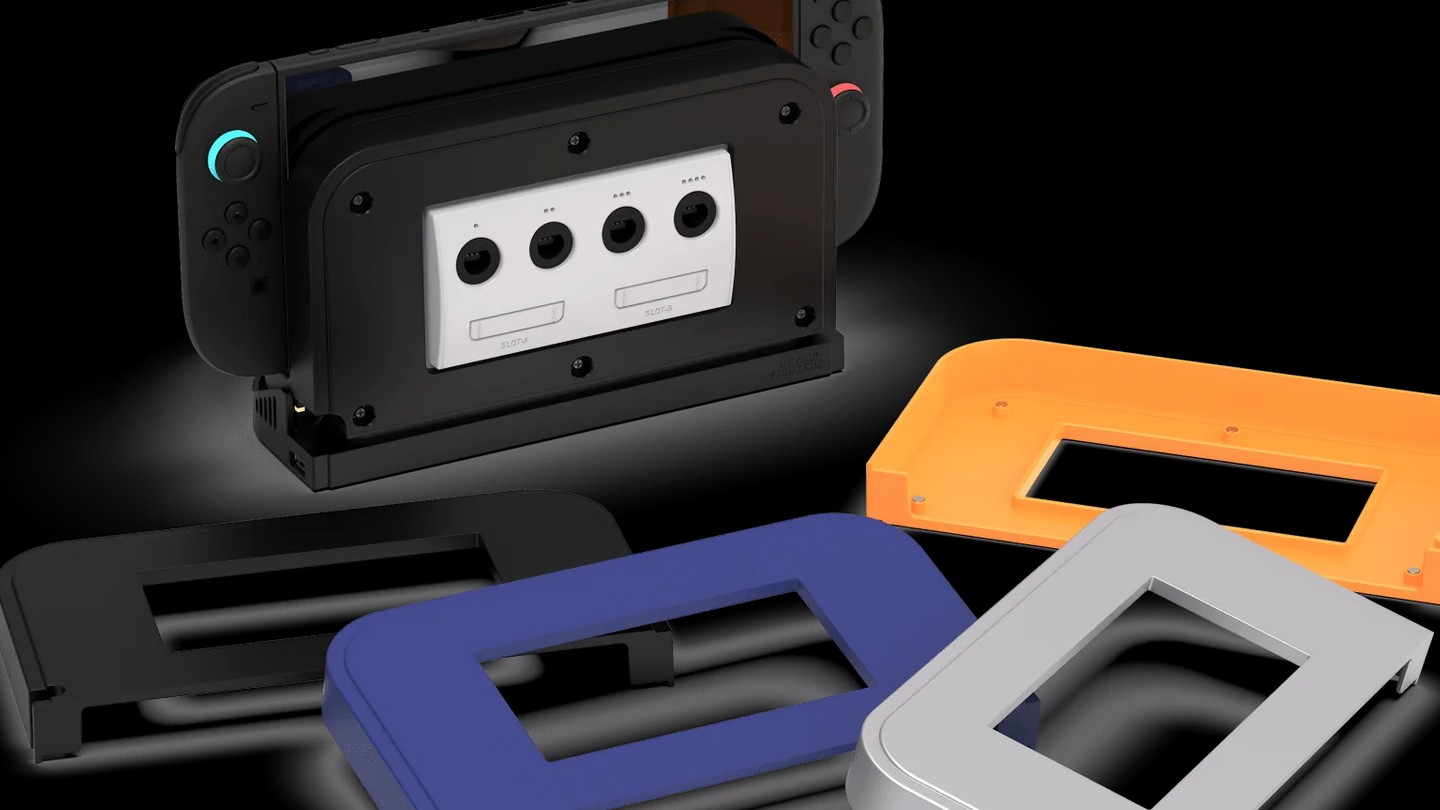
The faceplates, while glorious to look at, are also a little too easy to remove. I did knock one off here and there, but it was rarely an issue. Outside of these minor quibbles, this thing is outstanding.
Being $40 is also a selling point. Adding both functionality and pleasing aesthetics are totally worth it. These are the kinds of things I absolutely love for my modern consoles. Bringing that classic look with useful functionality at a very reasonable price.
If you are in the market for a GameCube controller solution for your Switch, I cannot recommend this enough. It is easy to setup, the build quality is excellent, and outside a couple of gripes, there is little downside to this device.
Review copy of game provided by publisher.